
Dekart Private Disk
The best AES 256 bit data encryption software for Windows
Program Profile
Released: 6/20/2014
Version: 2.15
Size: 3.3 Mb
Platforms:
Windows 9x/ME, NT/2000/XP, 2003, Vista/7/8/10 (32 and 64-bit)
Download for Free - for other language versions go to Downloads Page
- Private Disk finds your important files and encrypts them automatically with the strongest encryption algorithm available today
- Disk Firewall
offers excellent protection against viruses, spyware and trojans without slowing down your system
like an antivirus does.
- Access your data anywhere, even if you don't have administrative rights.
- Compatible with Windows Mobile and Windows CE (via Secubox from Aikosolutions).
- Free unlimited support and updates.
Private Disk is hard disk encryption software with unique features, combining strong NIST-certified AES 256-bit encryption with a simple and straightforward interface.
This disk encryption program creates multiple encrypted disks for storage of confidential information. Encrypted disks behave like regular disks, your programs can use them in a usual way, there is no need to reconfigure them.
Automatic data encryption is transparent: files are encrypted on the fly when they are written to the encrypted disk, and decrypted when read from it.
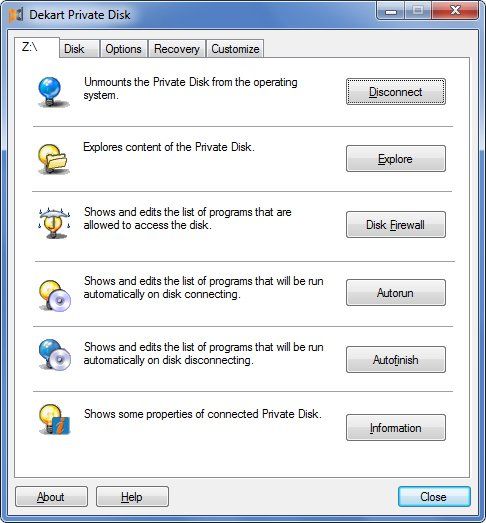
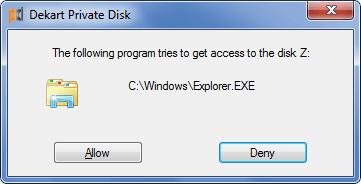
Access to the encrypted disk is monitored by Disk Firewall, a unique data protection mechanism that guards your data from Trojans, viruses or other types of malware. Disk Firewall controls which applications are allowed to access the encrypted disk. If a specific application is not found in the white-list, it will be unable to read or change the confidential information stored on the encrypted disk.
USB Disk Portability
Private Disk can run from portable media: USB flash drives, external hard disks, flash memory cards, DVDs, mp3 players such as the iPod. This disk encryption software can be launched without having to be installed on the computer, thus you can work safely with your protected data, no matter where you are.
To prevent data loss, Private Disk automatically invokes the safe hardware removal procedure when you close it.
Administrative privileges are not required if Private Disk was previously launched by an administrator. If that is not the case, the encrypted image will be accessible as an archive, you can extract files from it, or add new data.
- Disk Firewall protects data from illegal copying, viruses and spyware, allowing only whitelisted applications to access the encrypted disk. The self-learning mode builds the whitelist of applications automatically.
- Authenticity verification of trusted applications ensures that the trusted program was not modified after it was added to the white list. This way, Private Disk protects the data from threats that come from compromised trusted applications (such as a program infected with a virus).
- File Move – organize your documents and securely transfer them to an encrypted volume. The utility automatically finds the files you need, encrypts them, then wipes out the originals. File Move makes data migration simple and effortless; no file is left behind by accident.
- AES 256-bit encryption is the most secure symmetric encryption algorithm available today, chosen as a state standard due to its strength and efficiency.
- CBC mode with secret IVs for each sector is used for data encryption.
- NIST certification of all the cryptographic components applied in our encryption software . Why is NIST certified encryption software better?
- Portability – open your protected files on other computers by running Private Disk directly from a removable drive. The program can be migrated to a USB disk or flash memory card with a single click, while the built-in safe hardware removal feature helps you disconnect a removable disk quickly and safely.
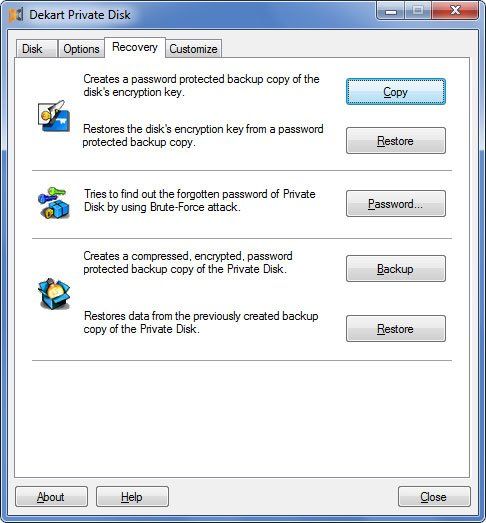
- Encrypted backups – create compressed encrypted backups of your protected data, making disaster recovery an easy process.
- Autorun and Autofinish – simplify your tasks and save your time by automating the execution of specific applications located on the encrypted drive or when a disk is mounted or dismounted.
- Data wiping – securely erase encrypted data, making sure that data recovery tools fail to obtain fragments of your encrypted files.
- Encryption key backup allows you to restore your protected files in cases when the media on which the encrypted disk is stored becomes corrupt.
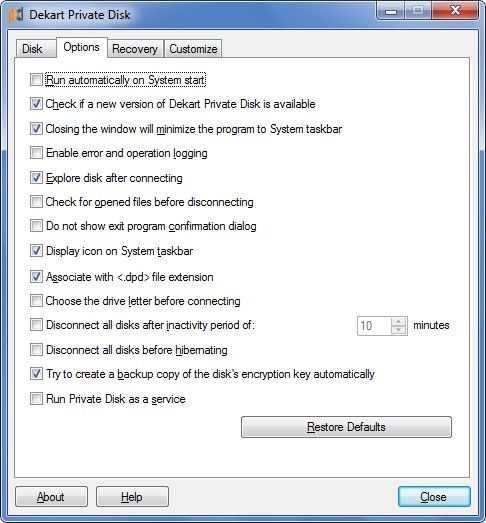
- Protect unattended computers – encrypted disks are dismounted automatically after an inactivity period – this will back you up in case the tea-break took longer than you initially planned.
- Mount multiple disks simultaneously and manage your files in a better way, keeping different types of files on different disks.
- A broad range of media can be used to store the encrypted data. Among the supported storage units are external hard drives, flash memory cards, USB flash drives, iPods, etc.
- Hibernate control allows you to decide whether the disks will be left connected when the system hibernates.
- Friendly licensing policy – use the same license of Private Disk on multiple computers without additional fees.
- Friendly upgrade policy – upgrade to new versions for free; get discounts for major updates.
- Free unlimited technical support via phone and the Internet.
No backdoors
Unlike other software encryption products, Private Disk does not contain backdoors or government induced escrow keys that would allow the police, or any other authority to decrypt your confidential information. Dekart is located in the Republic of Moldova, our state does not have laws that force us to add backdoors to encryption software.
Use cases (based on real customer experience and testimonials)
USB flash drive encryption = Private Disk + USB flash drive
The key-detail of this use case is Private Disk's ability to run directly from a removable disk and mount the encrypted disk on another computer without having to install the application locally.
The encrypted disk resides on the same USB flash drive, therefore the bundle is entirely self-contained, which means that additional media does not have to be transported, saving both: space in your pocket and the time needed to access your encrypted files.
CD/DVD encryption = Private Disk + CD/DVD
Private Disk is distributed on compact disks that have a pre-installed read-only encrypted image and a startup script that automatically mounts the virtual drive and starts a defined application when the disk is inserted into the CD- or DVD-ROM.
Disk Firewall is configured to allow only the applications that are stored within the encrypted disk, which guarantees that the distributed files will not be copied or modified.
This makes Private Disk ideal for the secure distribution of brochures or other presentations that are not intended to be viewed by the public.