
How to protect your digital certificate with Dekart RSA Cryptoprovider
Introducing Dekart RSA Cryptoprovider secret key will never be revealed by somebody else.
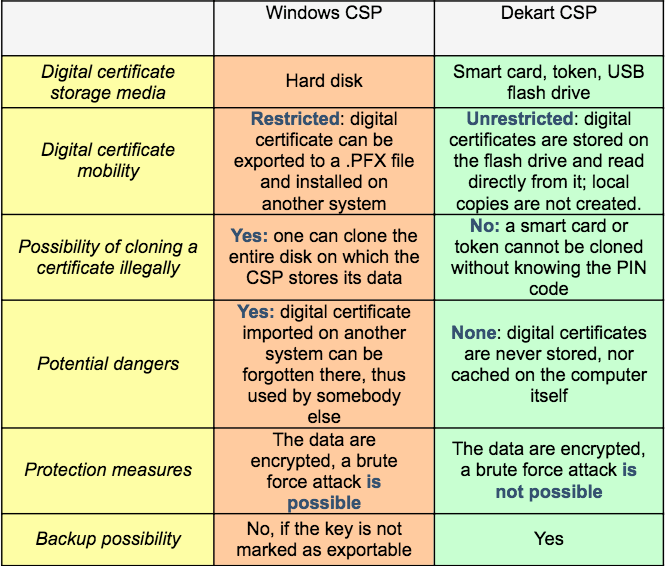
Dekart RSA Cryptographic Provider goes beyond the functionality of a basic CSP, allowing you to use digital signatures and PKI-based mechanisms without being tied to a single computer. You can migrate your digital certificates to a smart card, token, or a removable disk, and use the digital certificate on another workstation without having to locally install it, not even temporarily. This makes electronic document interchange a quick and safe procedure, protecting you from the risks of identity theft.
A quick comparison chart between the standard Windows CSP and Dekart CSP:
Facts about digital certificates:
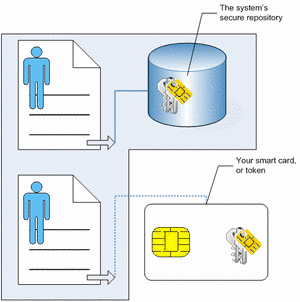
A cryptoprovider will store the secret key of the digital certificate in a special repository , to which additional security mechanisms are applied. On the other hand, the digital certificate itself is not protected, since it does not contain any information that (if revealed) may have a negative impact on your privacy. Each digital certificate contains a reference, which allows the cryptoprovider to determine which of the stored secret keys correspond to a given digital certificate. Whenever an application tries to use the secret key, it accesses the digital certificate; afterwards the reference is used by the system to find out where to look for the secret key.
This is where Dekart RSA Cryptographic Provider steps in, allowing you to move the keys or the digital certificate itself to a smart card or token. In the chart below you can see two digital certificates, one of them uses the standard Windows cryptographic provider, and the other one uses the enhanced Dekart cryptographic provider. In the second case, it is clear that the sensitive data are separated from the operating system, and stored in an entirely different location, being invulnerable to any attack against the OS.
How it works:
The decision is determined by how often you need to use the digital certificate, and by the performance of your smart card and smart card reader. Reading data off a smart card is not as fast as reading data stored on a hard disk; the transfer speeds are much lower. If you are often requested to provide your digital certificate
In contrast, if your main concern is privacy and obscurity, you should migrate the digital certificate to the secret key as well.
Conclusions
Dekart RSA Cryptographic Provider gives you all the mobility you could wish for, making your infrastructure more secure. It allows you to engage in secure data transmissions from computers other than your home or office PC, while the risk to become a victim of identity theft is nil.
List of Services
-
Missing RegistrationList Item 1
Contact us if you did not receive the registration key after your purchase
-
Berofe you contact usList Item 2
How to help us help you
-
Knowledge baseList Item 3
Learn how to protect your data and use our software
-
List of supported devicesList Item 4
USB flash disks, smart cards, tokens, biometric devices
-
Device compatibility
Will your hardware device work with Dekart software?
-
Documentation
User guides for Dekart products